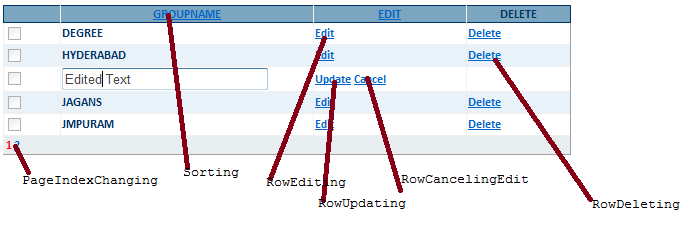
GridView is the most reused tool in ASP.NET. This gridview contains 7 major events which are always used in every situation.
- grdGroups_PageIndexChanging
- grdGroups_RowDeleting
- grdGroups_RowEditing
- grdGroups_RowCancelingEdit
- grdGroups_RowUpdating
- grdGroups_RowCommand
- grdGroups_Sorting
All the above events are web server events which are coded as below
//This PageIndexChanging event is used for navigating from one page to another page. Here page means set //of records. Each page contains count of records. The page size is defined in code behind.
protected void grdGroups_PageIndexChanging(object sender, GridViewPageEventArgs e)
{
try
{
grdGroups.PageIndex = e.NewPageIndex;
GetGroups();
}
catch (Exception ex)
{
Throw ex;
}
}
//This RowDeleting Event is used for deleting a single record at a time.
protected void grdGroups_RowDeleting(object sender, GridViewDeleteEventArgs e)
{
try
{
objGrp.GroupID = Convert.ToInt32(Session["GroupID"].ToString());
objGrp.UserID = Convert.ToInt32(Session["loginid"].ToString());
objGrp.DeleteGroup();// This method contains original logic for deleting the record.
GetGroups();
}
catch (Exception ex)
{
Throw ex;
}
}
//RowEditing Event is used for setting up the selected record in edit mode.
protected void grdGroups_RowEditing(object sender, GridViewEditEventArgs e)
{
try
{
grdGroups.EditIndex = e.NewEditIndex;
GetGroups();
}
catch (Exception ex)
{
Throw ex;
}
}
//CancelEdit Event is used for reset the selected record from edit mode.
protected void grdGroups_RowCancelingEdit(object sender, GridViewCancelEditEventArgs e)
{
try
{
grdGroups.EditIndex = -1;
GetGroups();
}
catch (Exception ex)
{
Throw ex;
}
}
//After Edit the selected record values, this RowUpdating Event is used to update the edited values.
protected void grdGroups_RowUpdating(object sender, GridViewUpdateEventArgs e)
{
try
{
TextBox txt = (TextBox)grdGroups.Rows[e.RowIndex].FindControl("txtgroupName");
grdGroups.EditIndex = -1;
objGrp.GroupName = txt.Text.Trim();
objGrp.GroupID = Convert.ToInt32(Session["GroupID"].ToString());
objGrp.UserID = Convert.ToInt32(Session["loginid"].ToString());
objGrp.UpdateGroup(); // This method contains original logic to update the record on database.
GetGroups();
}
catch (Exception ex)
{
Throw ex;
}
}
//This event is used for external purposes like button click events inside a grid.
protected void grdGroups_RowCommand(object sender, GridViewCommandEventArgs e)
{
try
{
if (e.CommandName.ToString() == "Update")
{
Session["GroupID"] = e.CommandArgument.ToString();
}
if (e.CommandName.ToString() == "Delete")
{
Session["GroupID"] = e.CommandArgument.ToString();
}
}
catch (Exception ex)
{
throw ex;
}
}
//Row_Sorting Event is used for sorting the record by selecting the column.
protected void grdGroups_Sorting(object sender, GridViewSortEventArgs e)
{
try
{
DataTable dt = ((DataSet)ViewState["GroupList"]).Tables[0];
dt.DefaultView.Sort = e.SortExpression + " " + GetSortDirection(e.SortExpression);
grdGroups.DataSource = dt;
grdGroups.DataBind();
}
catch (Exception ex)
{
throw ex;
}
}
private void GetGroups()
{
try
{
objGrp.UserID = Convert.ToInt32(Session["loginid"].ToString());
DataSet ds = objGrp.GetGroupsbyUser();
ViewState["GroupList"] = ds;
if (ds.Tables[0].Rows.Count > 0)
{
grdGroups.DataSource = ds.Tables[0];
grdGroups.DataBind();
}
else
{
// Below code is used for displaying some text if there is no record to bind to grid.
ds.Tables[0].Rows.Add(ds.Tables[0].NewRow());
grdGroups.DataSource = ds;
grdGroups.DataBind();
int columnscount = grdGroups.Columns.Count;
grdGroups.Rows[0].Cells.Clear();
grdGroups.Rows[0].Cells.Add(new TableCell());
grdGroups.Rows[0].Cells[0].ColumnSpan = columnscount;
grdGroups.Rows[0].Cells[0].HorizontalAlign = HorizontalAlign.Center;
grdGroups.Rows[0].Cells[0].ForeColor = System.Drawing.Color.Red;
grdGroups.Rows[0].Cells[0].Font.Bold = true;
grdGroups.Rows[0].Cells[0].Text = "No Groups List";
}
}
catch (Exception ex)
{
Throw ex;
}
}
//This method is used in Row_Sorting Event.
private string GetSortDirection(string column)
{
// By default, set the sort direction to ascending.
string sortDirection = "ASC";
// Retrieve the last column that was sorted.
string sortExpression = ViewState["SortExpression"] as string;
if (sortExpression != null)
{
// Check if the same column is being sorted.
// Otherwise, the default value can be returned.
if (sortExpression == column)
{
string lastDirection = ViewState["SortDirection"] as string;
if ((lastDirection != null) && (lastDirection == "ASC"))
{
sortDirection = "DESC";
}
}
}
// Save new values in ViewState.
ViewState["SortDirection"] = sortDirection;
ViewState["SortExpression"] = column;
return sortDirection;
}
Code Behind
<asp:GridView ID="grdGroups" runat="server" AutoGenerateColumns="false"
CssClass="GridStyle" AllowPaging="True"
onpageindexchanging="grdGroups_PageIndexChanging"
onrowcancelingedit="grdGroups_RowCancelingEdit"
onrowdeleting="grdGroups_RowDeleting" onrowediting="grdGroups_RowEditing"
onrowupdating="grdGroups_RowUpdating" PageSize="5" Width="70%"
onrowcommand="grdGroups_RowCommand" onsorting="grdGroups_Sorting" AllowSorting="true">
<Columns>
<asp:TemplateField>
<ItemTemplate>
<asp:CheckBox ID="CheckBoxSelect" runat="server" Enabled="false"/>
</ItemTemplate>
<EditItemTemplate>
<asp:CheckBox ID="CheckBoxSelect" runat="server" Enabled="false"/>
</EditItemTemplate>
</asp:TemplateField>
<asp:TemplateField HeaderText="GroupName" HeaderStyle-Width="250px" SortExpression="groupname">
<ItemTemplate>
<%#Eval("groupname")%>
</ItemTemplate>
<EditItemTemplate>
<asp:TextBox ID="txtgroupName" runat="server" CssClass="controlStyle" Text='<%#Eval("groupname")%>' MaxLength="20">
</asp:TextBox>
<asp:RequiredFieldValidator ID="RequiredFieldValidator1" runat="server"
ErrorMessage="! Enter group Name" ControlToValidate="txtgroupName" ValidationGroup="G" Text="!!">
</asp:RequiredFieldValidator>
</EditItemTemplate>
</asp:TemplateField>
<asp:TemplateField HeaderText="Edit" HeaderStyle-Width="150px" SortExpression="GroupID">
<ItemTemplate>
<asp:LinkButton ID="lnkGroupEdit" runat="server" CommandName="Edit" ToolTip="Edit this Group"
Text="Edit"></asp:LinkButton>
</ItemTemplate>
<EditItemTemplate>
<asp:LinkButton ID="lnkGroupUpdate" runat="server" CommandArgument='<%#Eval("GroupID")%>' CommandName="Update"
Text="Update" ValidationGroup="G" ToolTip="Update"></asp:LinkButton>
<asp:LinkButton ID="lnkCancel" runat="server" CommandName="Cancel"
Text="Cancel"></asp:LinkButton>
<asp:ValidationSummary ID="ValidationSummary1" runat="server" ShowMessageBox="true" ShowSummary="false" ValidationGroup="G"/>
</EditItemTemplate>
</asp:TemplateField>
<asp:TemplateField HeaderText="Delete">
<ItemTemplate>
<asp:LinkButton ID="lnkGroupDelete" runat="server" CommandArgument='<%#Eval("GroupID")%>' CommandName="Delete" Text="Delete"
ToolTip="Delete this Group" OnClientClick="javascript:return confirm('If you delete this Group, all Contacts of this Group Also Deleted,Are you sure you want to delete this Item?');"></asp:LinkButton>
</ItemTemplate>
<EditItemTemplate>
</EditItemTemplate>
</asp:TemplateField>
</Columns>
<HeaderStyle CssClass="GridHeader" />
<AlternatingRowStyle CssClass="GridAlter" />
<RowStyle CssClass="gridrowstyle" />
<PagerStyle CssClass="GridPager" />
</asp:GridView>